

A hand scanner does one thing well. You point it at a label, pull the trigger, and the till beeps and adds one. Ten items are ten beeps. Nobody taps a screen between them, and nobody looks down at the counter to check.
A phone camera can do the same job, but most phone tills make it a chore: open the camera, hold it still, wait for the confirmation sheet, tap Add, go back, do it again. By the fourth item the queue has noticed. Shop Counter was built to behave like the hand scanner instead, and this post is about how: what happens when you scan a basket, the three ways a code can be read, the beep, what the app does with a barcode it has never seen, and the codes it understands.
Ten beeps, one tap
On Sell, the Scan button opens the camera in a sheet. The sheet stays up. Each barcode you put in front of the camera is read, the phone beeps and buzzes, the viewfinder flashes green, and the item lands on a list under the camera with its price. Scan the next one, and the next. The footer counts up as you go: how many items, how many units, and the units by category, so you can see at a glance that the basket is four chilled and two drinks. When the basket is done, one tap on Done closes the camera with every line already on the till. The button says what you are about to ring up: Done · 10 items · £13.79.
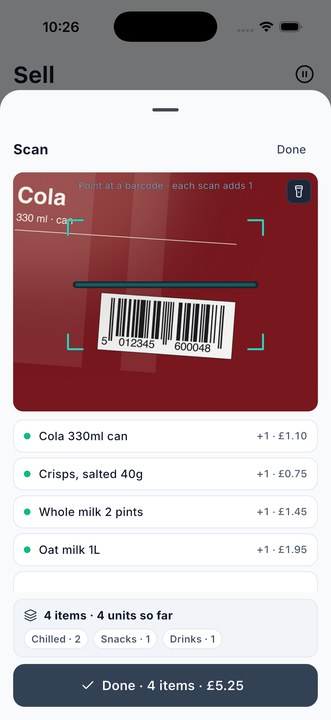
The same sheet does the other two jobs a scanner has in a shop. On Stock in, each scan adds one to the delivery and shows the new total: +1 · now 14. On Count, each scan is one more on the pile. Hold a case of twenty-four in front of the camera and it is counted as twenty-four, which is the next section.
Why a scan is accepted only on the second look
A camera is not a laser. It can misread, and the usual way that shows is a long code, like the Code 128 on a shelf label, being read in part as a valid eight-digit code for something else. So Shop Counter does not accept a code the first time it sees it. It waits until the same code has been seen on two frames in a row, which takes a fraction of a second and stops the misread before it reaches the till.
Two more rules keep a basket honest. Only a code inside the drawn frame on the viewfinder counts, because the camera sees the whole shelf and without that rule a neighbour’s label gets read first. And once a code has been read, the same code is ignored for just over a second, so a label held in front of the camera adds one, not ten. To add a second of the same item, pull it away and scan it again, or tap plus on the till.
Three ways to pull the trigger
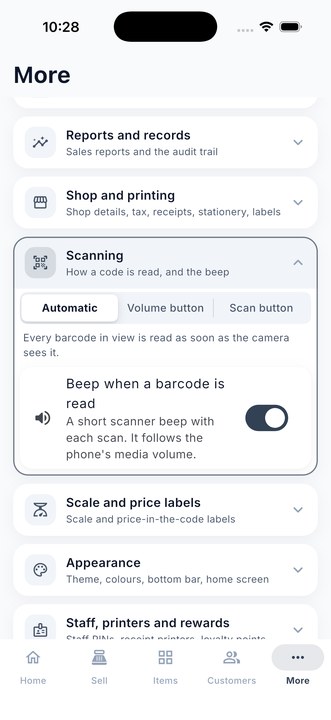
Open More, then Scanning. The first choice is how a code is read.
Automatic is the default. Every barcode in view is read as soon as the camera sees it, which is the quickest way through a basket on a counter where the items come to the camera one at a time.
Volume button turns the phone into a hand scanner. Aim the camera, then press volume down to read what is in the frame. One press, one read. While Sell or Stock is open, the button no longer changes the volume; everywhere else in the phone it works as normal. This is the mode for a crowded shelf or a stock room, where three labels are in view and you want to say which one. It needs iOS 17.2 or later, or Android.
Scan button puts a button under the camera. Aim, then tap it: one read per tap. The same control as the volume button, for anyone who prefers the screen, or a phone whose volume button is awkward to reach in a case.
The beep
Hand scanners beep for a reason: your eyes are on the customer, not the screen. Shop Counter makes the same short two-tone chirp on every read, played through the phone’s own speaker and following its media volume, and the phone buzzes at the same time. The beep is a switch on the same Scanning page, for anyone who runs a quiet shop or has a scanner with its own.
A code the shop has never seen
Sooner or later somebody puts a new line on the counter. The scan lands on the list the same as any other, marked Not an item yet, with an Add button beside it. Tap it and the item sheet opens with the barcode already in place.
If the phone has a connection, Shop Counter also asks the public product databases run by Open Food Facts whether they know the code, and if they do, suggests the name and size: Oat drink 1 L. The sheet says where the name came from and asks you to check it before you save, because nothing from the internet goes into your stock book unseen. Most codes on a corner shop’s shelves are in those lists; a local bakery’s are not, and then you type the name. Either way the item exists from that moment, with its barcode, and the next scan of it goes straight through.
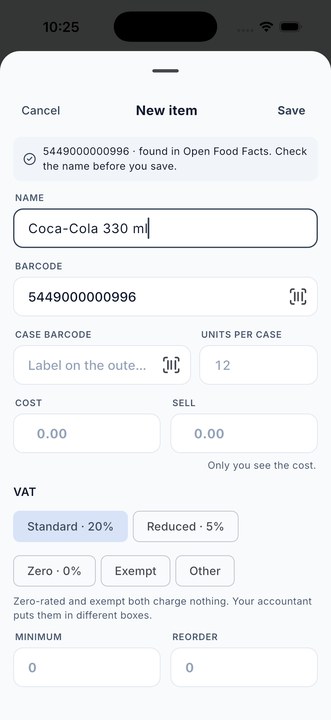
One rule holds throughout: a barcode belongs to one item. If you try to give a second item a code that is already on the shelf, the app says so and offers to open the first one, because two items with one barcode would make every scan a question.
Cases and the question “which one?”
Wholesale stock arrives in outers, and the outer has its own barcode on the box. Each item can carry two codes: the unit barcode and a case barcode with the case size. Scan the box on a delivery and the app adds the whole case, twenty-four cans, not one. Scan a can at the till and it adds one.
Where a code could mean more than one thing, say a unit and its case share a number, or two items were given the same code before the rule above existed, the sheet stops and asks: Which item? Pick one and carry on. It never guesses.
Codes it reads
The retail codes, EAN-13 and EAN-8, and the American UPC-A and UPC-E, which cover almost everything on a supermarket shelf. Code 128, Code 39 and Code 93, the codes on shelf-edge labels, delivery notes and internal stock labels. ITF-14, the big code on the side of a case. And QR codes and Data Matrix, so your own labels can use either.
For stock with no code at all, loose produce, a bakery’s rolls, a bag of screws made up at the counter, print your own: Items, then Labels, tick the items and the quantity, and the sheet or roll size is set once under Layout. A label printed that way scans back like any other.
At a keyboard, a real scanner
When the stock room is counted from a computer, through Desktop access on the shop’s own Wi-Fi, a USB barcode scanner plugged into the computer works at once: it types the code into the page, and the page treats it as a scan. The phone remains the till; the computer is the second pair of hands.
What it adds up to
A phone in your pocket that scans a basket like the scanner bolted to a supermarket till, with a beep you can hear, a trigger you can choose, and a stock book that goes down by one with every sale because the till and the book are the same thing. No scanner to buy, no account, and nothing goes through the internet unless you ask it to look a code up.
Shop Counter is free on Google Play and the App Store, at brightscalelabs.com/apps. The day on the counter, from delivery to cash-up, is in the earlier post.