

“Change the oil once a year” and “change the oil every 100 hours” are both right, for different machines. The mistake is picking one and using it for everything.
A van that does long motorway runs wears by distance. A generator that sits for eleven months wears by time. A mower wears by hours in the summer and by sitting still in the winter. This guide shows how to decide which clock each job follows, and how to set a reminder that will not let either one slip.
Two clocks
The calendar. Time passes whether the machine runs or not. Oil picks up moisture, fuel goes stale, rubber hardens, batteries go flat, and some inspections are simply due on a date.
The meter. Hours on an engine, kilometres or miles on a vehicle. Parts wear in step with use: oil breaks down, filters fill, belts stretch, blades dull.
Most machines have jobs on both clocks. The question is never “is this an hours machine or a calendar machine?” but “which clock does this job follow?”
Jobs that follow the calendar
- Inspections and tests with a legal or insurance date. A vehicle roadworthiness test, a lifting-equipment examination, a gas safety check, electrical testing. The date is fixed by the rule, not by how much you used the thing. What applies to you depends on your country and your equipment, so check your own rules.
- Paperwork. Road tax, insurance, a warranty that ends.
- Seasonal jobs. Getting the mower ready before the season, draining or stabilising fuel before winter, checking the heating before the cold.
- Things that age. Coolant, brake fluid, tyres and batteries have a life in years, however little they are used.
- Machines that hardly run. A standby generator may do ten hours a year. By the meter it would never be serviced. It needs its oil changed by the calendar, and a test run on a schedule.
Jobs that follow the meter
- Engine oil and filters on anything that works for a living.
- Air and fuel filters, sooner in dust.
- Belts, blades, chains and bars.
- Greasing, often every few hours of work.
- Vehicle services, set by distance.
The meter matters because use is uneven. Two identical mowers bought on the same day can be 300 hours apart two summers later. Service both on the same date and one is serviced too late, or the other too early.
The safe rule: whichever comes first
For most engine jobs, makers give both figures: so many hours or so many months, whichever comes first. That one sentence covers both kinds of year:
- In a busy year the hours arrive first, and the machine is serviced on use.
- In a quiet year the months arrive first, and it is serviced anyway.
If your manual gives both figures for a job, use both. If it gives only one, use that one.
Where the numbers come from
From the maker’s manual, not from memory and not from the internet. Every engine and vehicle manual has a maintenance table: a list of jobs down the side, and the interval for each one. Find it, and copy out the jobs that apply to you.
Three things to look for in that table:
- The first service is often early. Many engines want their first oil change after a short running-in period, far sooner than the regular interval.
- There is usually a “severe conditions” note. Dust, heat, heavy loads, short runs and towing all shorten the intervals. If that describes your work, use the shorter figure.
- Different jobs have different intervals. Oil at one figure, air filter at another, spark plug at a third. Do not fold them all into one “service” unless the manual does.
Lost the manual? Most makers publish them on their websites, by model number.
A worked example
Take a ride-on mower whose manual says, say, oil and filter every 100 hours or 12 months. These figures are only an example; use your own manual’s.
- Used hard by a grounds business. It does 100 hours in about ten weeks of the season. The oil change comes round by the meter, two or three times a year. The 12 months never gets a chance.
- Used on one large garden. It does 30 hours a year. It would take more than three years to reach 100 hours. The 12 months catches it every year.
Same machine, same reminder, two different outcomes, and both are right.
You need to read the meter
A meter-based reminder is only as good as the last reading. A reading from March cannot tell you anything in July.
- Write the reading down every time you log a job. It costs nothing and it is the reading you will most want later.
- Read working machines on a routine. Once a week for something used daily, once a month for the rest. Tie it to something you already do, like fuelling up on a Friday.
- No hour meter? A stick-on or inline hour meter for a small engine is cheap and takes minutes to fit. Or use the calendar alone and shorten the interval a little.
- Meter replaced or broken? Note the old reading and the date it changed, so the history still adds up.
Set the reminder before it is due, not when
A reminder that fires on the day is too late to order a filter. Give yourself a warning window:
- By date: a week or two ahead, enough to book a garage or get parts.
- By meter: a set number of hours or kilometres ahead. For a machine doing ten hours a week, a 10-hour warning is one week’s notice.
Then look at the list on a fixed day each week. Overdue gets done, due soon gets its parts ordered, and everything else waits.
Common mistakes
- Calendar only, on a hard-working machine. It gets serviced at twice the hours it should.
- Meter only, on a machine that barely runs. It never gets serviced at all.
- One interval for every job. The oil is changed on time and the air filter is forgotten.
- Resetting the clock from the due date, not the done date. If the service was three weeks late, the next one counts from when it was actually done, and from the reading on that day.
- Nobody reads the meter. The reminder is still showing last spring’s hours.
Doing it on the phone
Asset Log’s reminders are built around this rule.
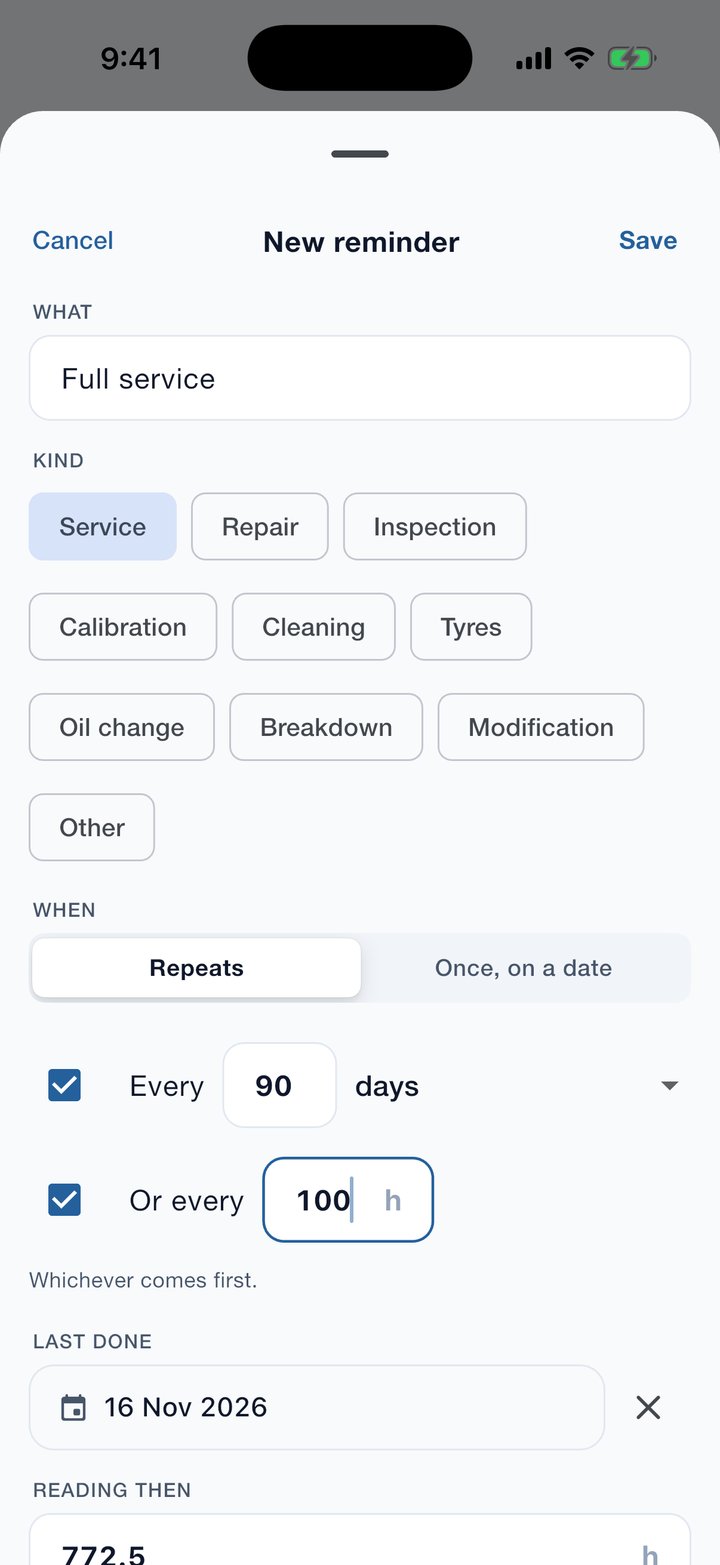
- By date, by meter, or both. Tick one box or two. With both, the app says “whichever comes first” and means it.
- Repeating or once. A service repeats; a warranty end date happens once.
- It counts from when the job was last done, and from the reading then, not from when it was due.
- Hours, kilometres or miles. Each asset has its own meter, and you can add a reading in a couple of taps from the home screen.
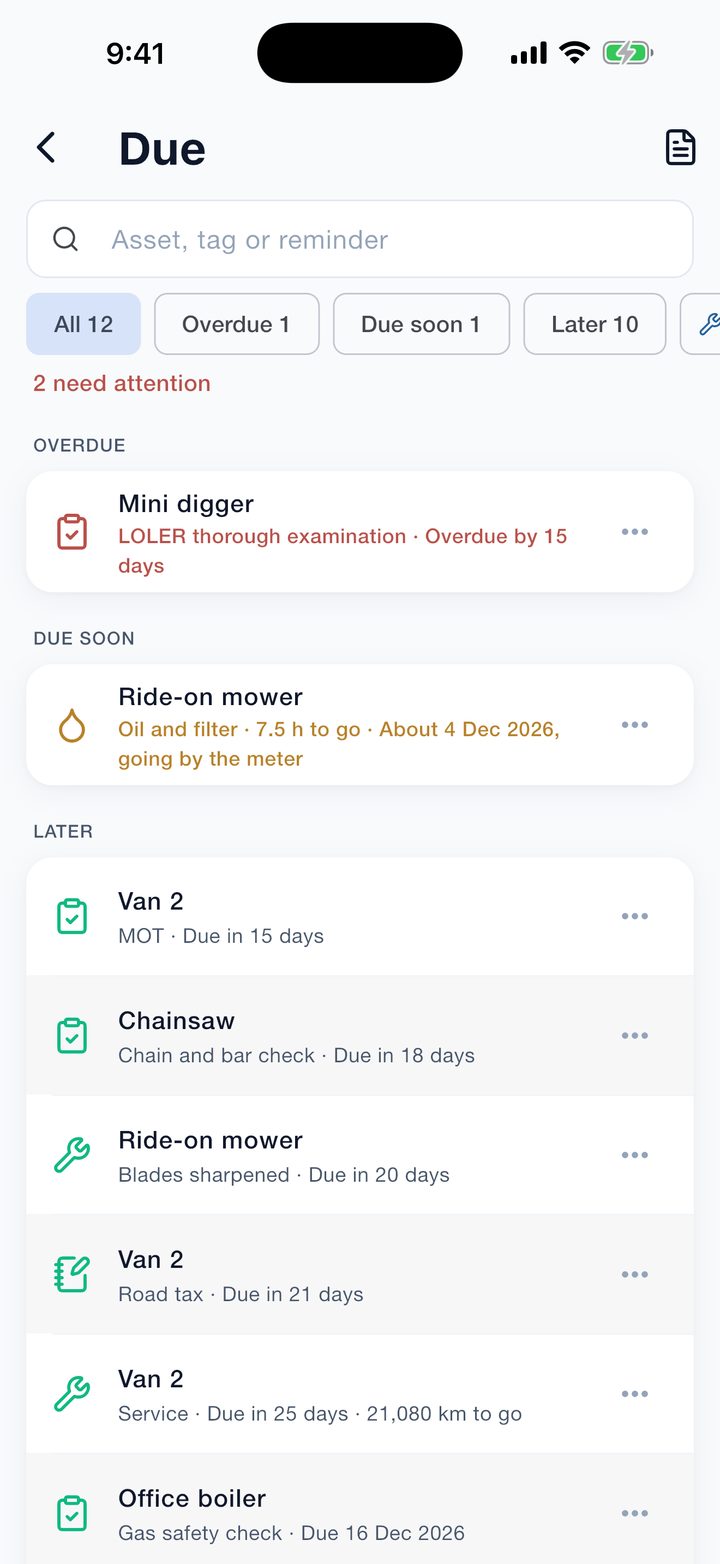
- It estimates the date from the meter. From your recent readings the app works out roughly when the hours will run out, so a meter reminder still shows a likely date.
- Logging the job ticks the reminder off and starts the next interval.
- One Due list for everything. Overdue, due soon and later, across every machine, tool and vehicle.
Asset Log is a record-keeping aid. Its reminders do not replace the inspections and tests the law requires of you, and they are only as good as the intervals and readings you give it.
It is free on the App Store and Google Play, at brightscalelabs.com/businesses/asset-log. What to write down after each job is in how to keep an equipment maintenance log, which comes with a free log sheet if you would rather start on paper.