

Pricing a house for decorating, plastering or flooring starts with a tape. Every room gets measured, every wall gets written down, the doors and windows get taken off, and the sums happen later at the kitchen table. It is an hour of standing in rooms and another hour of arithmetic, and the quote still has to be typed up after that.
Plain Estimate does the measuring with the phone. Walk round a room with the camera and it comes back with the floor, the walls, the openings, the run round the room and a plan. Tick what the room needs, and each tick becomes a line you can price, under a heading with the room’s name on it. Then the next room. This post is about how that works, what the app does with the figures, what goes on the quote, and what you get on a phone that cannot scan.
Walk the room
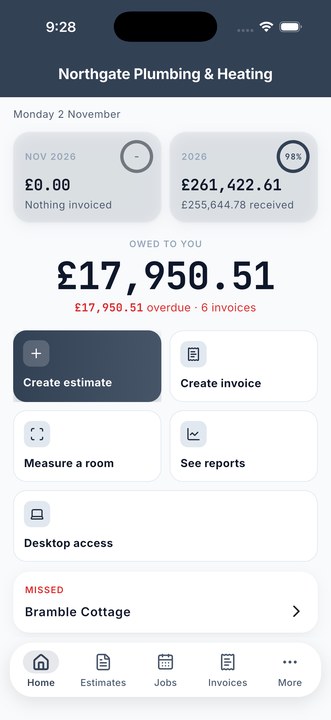
Measuring a room this way needs the laser scanner on an iPhone Pro, the 12 Pro and later, or an iPad Pro from 2020. Tap Measure a room on Home, or Scan rooms from inside an estimate, and the phone walks you round the room with the camera. When the scan finishes it has the floor area, the wall area, the doors and windows with their sizes, the distance round the room, the ceiling height, the room’s volume and a drawing of the floor plan.
The first question after the scan is what room it is. Ten names are offered as taps, Hall, Kitchen, Living room and so on, with a box for anything else. The name matters because it becomes the heading on the quote, so the client can see what they are paying for room by room. Scan a room whose name is already on the quote and the app asks whether this is the same room measured again or a second one, because usually it is the same bathroom, walked again because the first scan was rough or the job changed.
Tick what it needs
Then the sheet that does the work: what are you pricing here? It lists everything the scan measured, each with a note of what it is usually for.
- Floor, in square metres, for flooring, screed or floor tiles.
- Walls, the full wall area, for plastering and boarding.
- Walls, less doors and windows, for painting and papering. The openings are taken off for you.
- Round the room, in metres, for skirting, coving, dado or a pipe run.
- Room volume, in cubic metres, for screed, concrete, muck away and skips.
- Doors and windows, as a count, each with its size. A count on its own cannot be priced, because a glazier, a blind fitter and somebody hanging doors all need to know how big, so the sizes go into the line’s description.
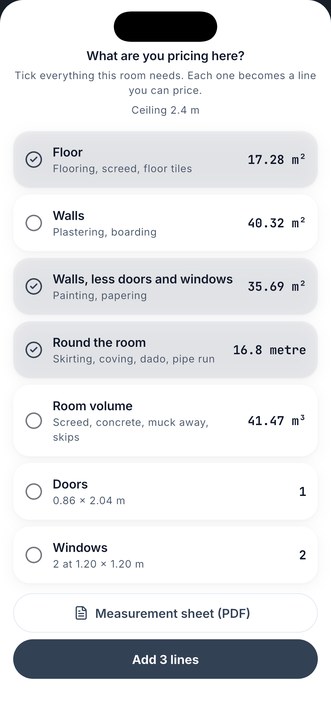
Tick the three a decorator needs and tap Add 3 lines. Each line goes on the quote under the room’s heading with the right quantity and the right unit, square metres for an area, metres for the run, each for a door. The line’s name is a plain guess, Floor, Walls, less doors and windows, Skirting or trim, and every one is meant to be typed over with what the work actually is: two coats of emulsion, or lay and seal.
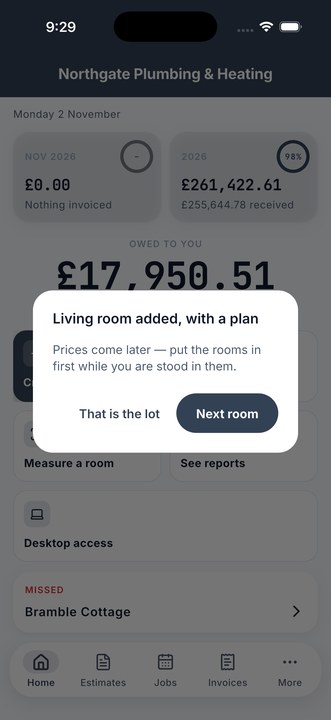
Then the app says the room is in, with its plan, and asks whether that is the lot or there is a next room. Prices come later. The point is to put the rooms in while you are stood in them, and do the pricing in the van.
The whole house, priced by the room
Back at the quote, each room is a section with a subtotal of its own. Put your rate against each line, from your own price list or typed in, and the arithmetic is done: a floor of nine and a half square metres at thirty-two pounds a metre is three hundred and four pounds sixty-four, the living room comes to its own figure, the kitchen to its own, and the total at the bottom is the house. A client reading it can see what the bedroom costs on its own, which is the question they will ask anyway.
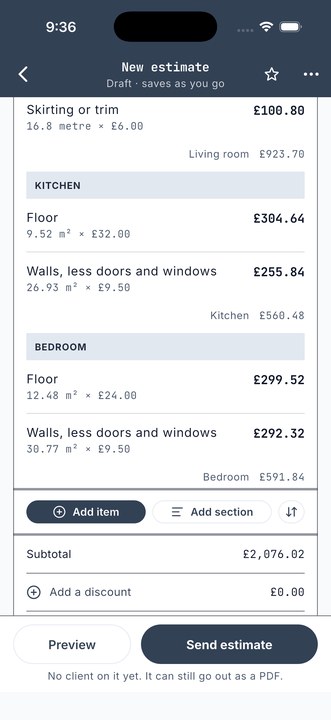
A scanned figure is rounded to two decimal places, because that is about what a camera scan is good for. It is accurate to roughly a per cent in good light and worse against glass or gloss, and a quote carrying three decimals reads like an app showing off rather than a trade who measured. A length you type in yourself is left exactly as you typed it. If a scan did not finish cleanly the sheet says so and asks you to treat the figures as rough and measure anything you are pricing tightly. The footer of every measurement sheet says the same thing: check against the room before you quote.
The plan on the quote
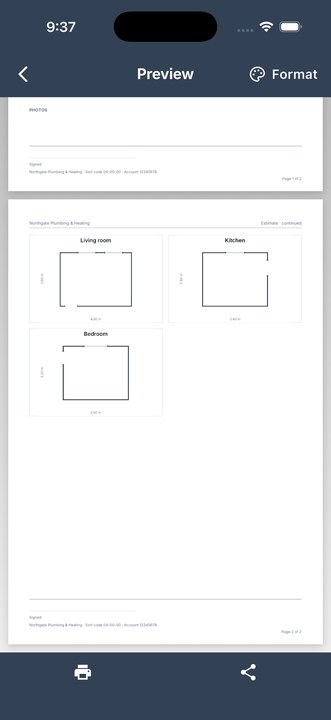
Each room’s floor plan goes onto the quote as a drawing, with the doors and windows marked and the sizes along the walls. It travels with the PDF the client gets, so the quote shows not just “Living room, floor, 17.28 square metres” but the shape of the room those figures came from. It is kept as a photo on the document, so it has a place on the page, shows in the photo list, and can be removed the same way as a photo of a boiler if a client does not need it. Walk the room again and the new drawing replaces the old one.
The measurement sheet
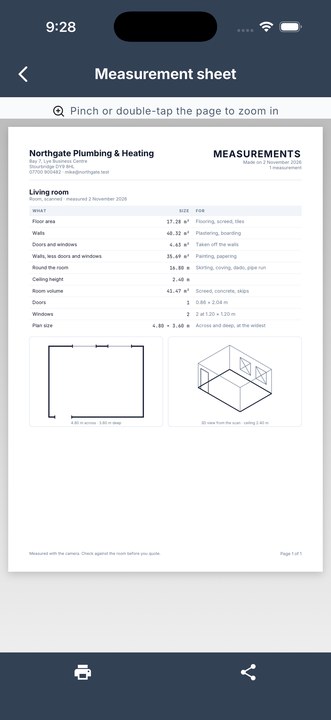
Everything you measure is kept on its own, whether or not it went on a quote, under More, then Documents, then Measurements. From there, or from the tick sheet, you can print or share a measurement sheet. It is a PDF with every figure for the room in a table, what it is and what it is for: floor area, walls, the doors and windows taken off, the net walls, the run round the room, ceiling height, volume, the counts, the plan size. Under the table are the plan and a 3D view of the room from the scan. It is the sheet to hand to a plasterer you are subcontracting to, or to keep in the job file for when the client asks six months later how big the kitchen was.
How many tins
A line priced by the square metre can also work out what to buy. Tap How many will I need? on the line, say what one tin or box or roll does, how many coats, and what to allow for waste, and it tells you how many to buy, rounded up, because nobody sells two thirds of a tin and the thing to avoid is being half a box short on a Friday afternoon.
Every other phone
Most phones cannot scan a room, and the app says so plainly rather than pretending. On those, add a line, tap Work it out from the measurements, type the length and the width, and the quantity is worked out for you. It takes ten seconds longer than the scan and ends in the same line on the same quote.
On an iPhone without the laser scanner there is also a tape: Measure it with the camera on a line, or from Home, takes one length with the camera and makes a line priced by the metre. Somebody quoting a run of fencing or guttering has one number to take and no room to walk round. That length is kept under Measurements too, and the app offers to start an estimate from it.
See the whole app in three minutes
What it adds up to
A quote for a house that is written in the house. Walk each room, name it, tick what it needs, and the quote has the rooms, the quantities, the plans and a measurement sheet before you have got back to the van. The pricing is yours, from your own price list, and the figures are honest about what a camera can and cannot measure.
Plain Estimate is free on Google Play and the App Store, at brightscalelabs.com/apps. The rest of the app, from the price list to getting paid, is in the guide.